WordPress Plugin

A Modern
File Manager
for WordPress

Windows Explorer–inspired file management with a clean admin dashboard and a responsive frontend explorer — powered by a simple shortcode.
check_circle WordPress 5.6+
check_circle PHP 7.4+
check_circle GPL v2+
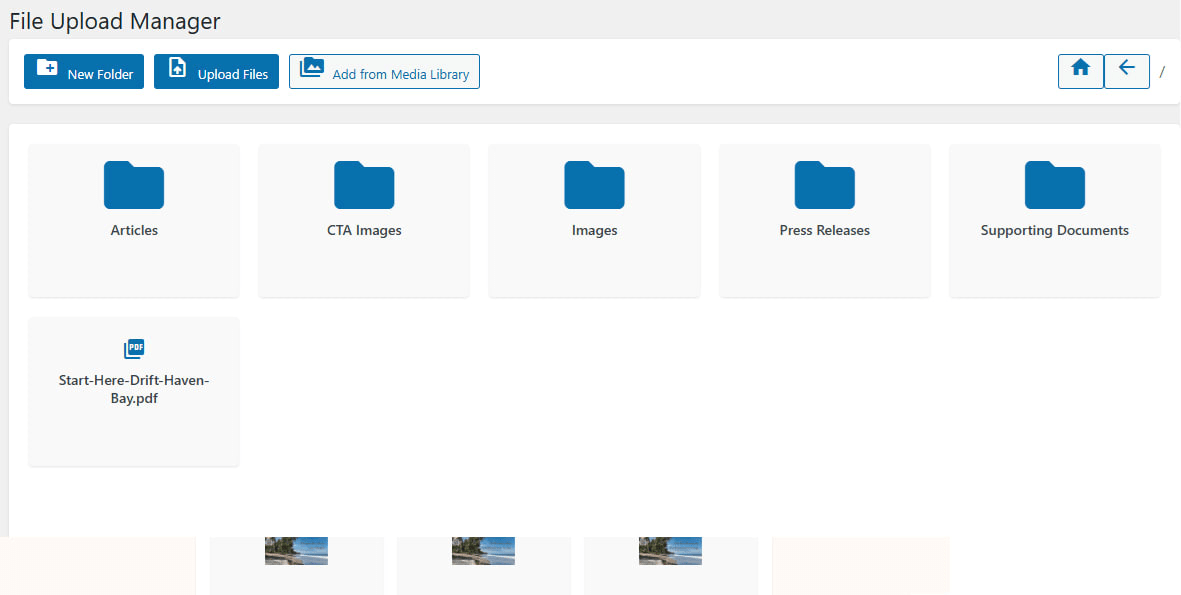
Admin file explorer interface
0% Free & Open Source
WP 0.6+ WordPress Compatibility
0-Click Setup No Configuration Needed
0 Core Features Everything You Need
Why Choose This Plugin

Powerful Features

Everything you need to manage, share, and deliver files on your WordPress site.

dashboard

Explorer-Style UI

Navigate with breadcrumbs, toolbar actions, pagination, and Material Icons — just like a desktop file manager.

cloud_upload

Admin Dashboard

Create folders, upload files with multi-select, import from Media Library, delete items, and download ZIPs — all from the admin.

code

Shortcode Driven

Embed the file explorer on any page, post, or custom post type with a simple [frontend_file_explorer] shortcode.

bolt

AJAX Powered

Fast, seamless navigation and pagination without page reloads. Smooth user experience guaranteed.

shield

Secure by Design

Nonce-protected endpoints, capability checks, path sanitization, and directory guard files keep your files safe.

folder_zip

One-Click ZIP

Download entire folders as ZIP archives with a single click. Perfect for sharing bundled resources.

link

Public Sharing Links

Copy direct download links to any file instantly. Share resources with clients or students effortlessly.

language

Translation Ready

Fully localized with the frontend-file-explorer text domain. Create translations using Loco Translate or Poedit.

See It In Action

Screenshots

A look at both the admin dashboard and the frontend file explorer.

yoursite.com/wp-admin/…
Admin file explorer interface
admin_panel_settings Admin Dashboard

Manage files, create folders, upload, import, delete, and download ZIPs directly from the WordPress admin.

yoursite.com/downloads
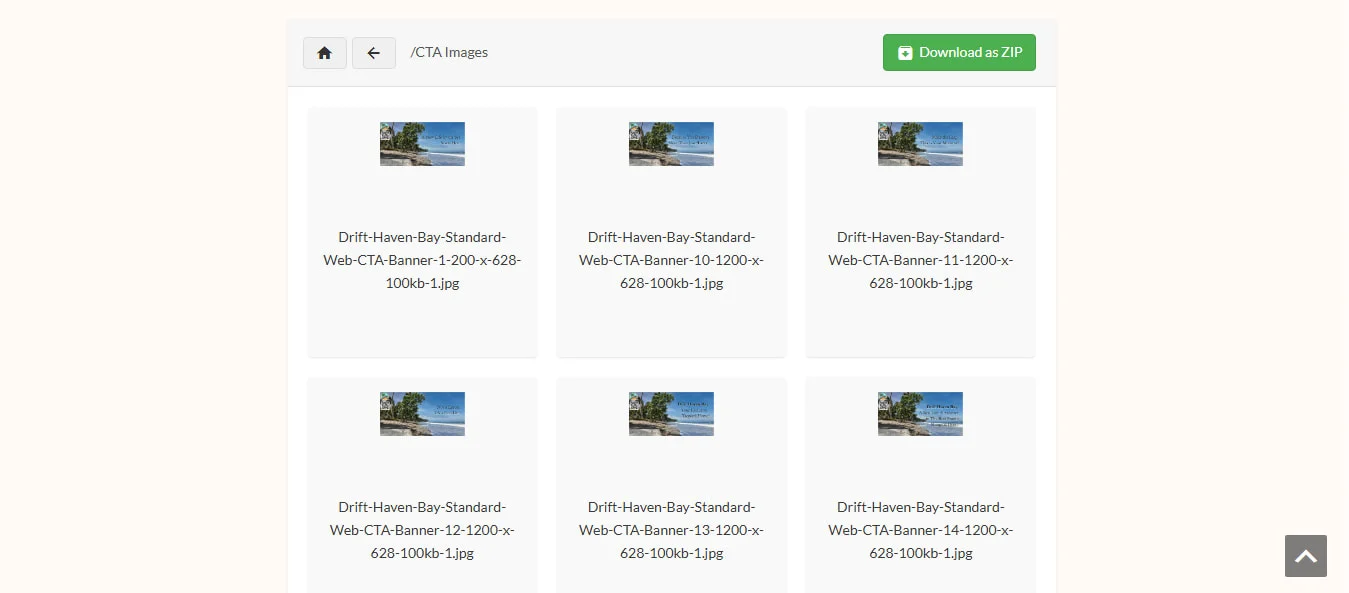
Frontend file explorer view
public Frontend Explorer

Browse, download files, and copy sharing links from a responsive, user-facing file explorer embedded via shortcode.

Quick Start

How It Works

Get up and running in three simple steps.

1

Install & Activate

Install the plugin from the WordPress plugin directory or upload it manually. On activation, it auto-creates the secure uploads/downloads directory.

2

Organize Your Files

Navigate to File Upload in the admin sidebar. Create folders, upload files, and import assets from the Media Library.

3

Publish & Share

Add [frontend_file_explorer] to any page. Your visitors can browse, download files, and copy sharing links instantly.

Built For

Who Is This For?

school

Course Creators

Create a simple, branded downloads area for your courses and educational content.

business

Agencies & Freelancers

Share deliverables, contracts, and assets with clients through a professional file portal.

database

Site Owners

Get a lightweight, Explorer-like file manager without the bloat of heavy external tools.

Simple Embed

One Shortcode.
Full Power.

Embed the entire file explorer on any page with a single shortcode. Customize the starting folder, and you're done.

shortcode
[frontend_file_explorer] [frontend_file_explorer folder="/course-materials"] [frontend_file_explorer folder="/clients/acme-corp"]
Got Questions?

Frequently Asked Questions

Can I point the explorer to a different base folder?

Yes. You can override the constants in a custom mu-plugin before File Explorer loads, or use filters/hooks to adjust the base path/URL. This is an advanced customization and should be done carefully.

Does the plugin work in multisite?

Yes. Each site manages its own uploads/downloads directory. You can network-activate the plugin for consistency across sites.

Are file types restricted?

By default, allowed file types are defined via options during activation. You can adjust the allowed extensions by updating the plugin options (e.g., file_explorer_allowed_file_types).

How do I translate the UI?

The plugin is fully localization-ready with the frontend-file-explorer text domain. Use Loco Translate or Poedit to create translations and drop .mo files in the languages/ directory.

Is the frontend secure?

Absolutely. Destructive or mutating actions (upload, folder creation, deletion) are strictly hidden from public visitors. Only logged-in users with the upload_files capability can manage files.

Can I restrict the explorer to a specific folder?

Yes. Use the folder attribute in the shortcode: [frontend_file_explorer folder="/course-materials"] to start browsing from a specific subfolder.

What's New

Changelog

v1.0.4

Latest
  • Sec Sanitized all $_FILES upload fields individually.
  • Sec Added is_uploaded_file() guard against path injection.
  • Std Fixed unordered placeholders in translatable strings.

v1.0.3

  • Sec Fixed unauthenticated file downloads, arbitrary PHP uploads, XSS via eval(), and server path disclosure.
  • Std Migrated to WP_Filesystem API, bundled Material Icons locally, added nonce verification and capability checks.
  • Std Renamed classes to WordPress underscore convention. Removed load_plugin_textdomain().

v1.0.2

  • Fix Resolved critical bug executing deletion logic instead of listing directory contents.
  • Fix Repaired "Download as ZIP" to eliminate ERR_INVALID_RESPONSE failures.
  • New Integrated missing backend endpoints for folder creation, file uploads, and Media Library imports.
  • Std PHPCS sweep: nonce verification, WP_Filesystem migration, translation fixes.

v1.0.1

  • Rename plugin to "Frontend File Explorer".
  • Align text domain with slug frontend-file-explorer.
  • Improve README and screenshots.

Ready to Manage Files
the Modern Way?

Install Frontend File Explorer and transform how you organize, share, and deliver files on your WordPress site.

new_releases Latest version: 1.0.4 • Tested up to WordPress 6.9